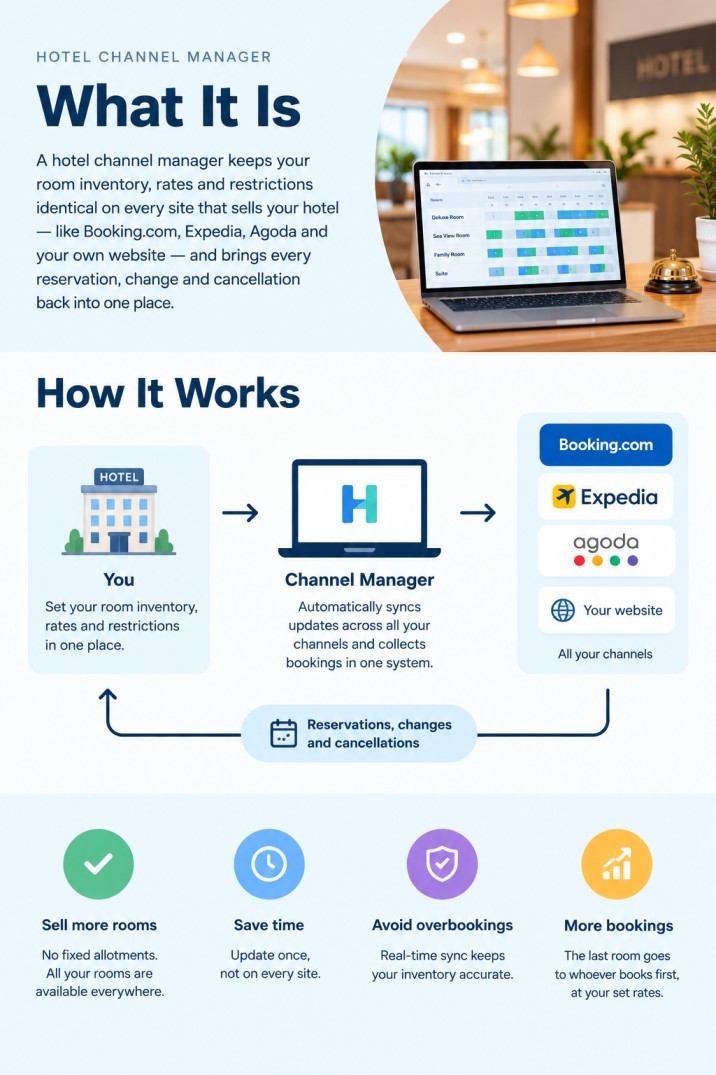
A hotel channel manager keeps your room inventory, rates and restrictions identical on every site that sells your hotel, such as Booking.com, Expedia, Agoda and your own website, and brings every reservation, change and cancellation back into one place. Instead of giving each site a fixed number of rooms, you sell all your rooms everywhere, and the last room can go to whichever channel books it first. For small hotels and B&Bs, the best choice is usually a channel manager with a built-in PMS and booking engine, with official connections to the OTAs your guests actually use, room types, rate plans, and support that answers at night.

Running a 12-room hotel on four booking sites by hand means updating 48 calendars every time a room sells, cancels or changes price, and hoping nobody books in the minutes in between. A channel manager does that work for you. But hotels sell in a way that is different from vacation rentals: room types, rate plans, restrictions and allotments all matter. This guide explains how hotel distribution works, the terms you will meet when you set it up, the types of hotel channel manager, and how to compare them for a small hotel or B&B.
In this guide
- The problem a hotel channel manager solves
- How it works: inventory, rates, restrictions, reservations
- 10 terms you will meet when you set it up
- How the connection to Booking.com and Expedia works
- How hotels differ from vacation rentals
- Hotel channel manager comparison: the four types
- What is the best channel manager for your hotel?
- The 12-question scorecard
- Hosthub for small hotels and B&Bs
- FAQ
The problem a hotel channel manager solves
Before channel managers, hotels sold through allotments: you gave Booking.com three rooms, Expedia three, kept the rest for phone and walk-in guests, and updated each extranet by hand. That causes two problems at once:
- Empty rooms: Booking.com sells out its three rooms on a busy Saturday, while the three you gave Expedia sit unsold.
- Overbookings: you move rooms between sites by hand, a booking arrives on the old number, and two guests have the same room.
A channel manager replaces fixed allotments with pooled inventory. Every channel sees all your available rooms of each type. When one sells, the count drops on every channel at once. You sell more nights, and the last room goes to whoever books first, at the price you set for that channel.
How it works: inventory, rates, restrictions, reservations
A hotel channel manager handles four flows, in two directions:
The speed of each flow matters. If an update takes minutes, a busy hotel rarely has a problem. If it takes hours, as calendar (iCal) links can, a sold room stays open long enough to be sold again.
10 terms you will meet when you set it up
Swipe the table to the right to see all columns ➜
| Term | What it means | Example |
|---|---|---|
| Room type | A group of identical rooms sold as one product | “Double room, sea view”: 6 rooms |
| Inventory | How many rooms of a type are available on a night | 4 of the 6 sea-view doubles free on 12 August |
| Rate plan | A price with its own conditions for the same room | Flexible, non-refundable, breakfast included |
| Pooled inventory | All channels sell from the same room count | The last room goes to whoever books first |
| Allotment | A fixed number of rooms reserved for one channel | 3 rooms “given” to one OTA; the old way |
| Minimum stay | The fewest nights a booking must include | 3 nights over a festival weekend |
| Closed to arrival / departure | No check-ins, or no check-outs, on a date | No arrivals on Saturday in peak season |
| Stop sell | Closing a room type or channel for sale | Stop selling one OTA when the hotel is nearly full |
| Mapping | Linking your room types and rates to the OTA’s | Your “Sea view double” to the OTA’s “Double Room with Sea View” |
| Rate parity | Offering the same price on every channel | Required by some OTA contracts; check yours |
How the connection to Booking.com and Expedia works
The big OTAs connect to channel managers through official APIs, and you approve the connection on their side:
- Choose your channel manager as connectivity provider in the OTA’s extranet. On Booking.com, this is in the Account section; Expedia has its own connectivity settings in Partner Central.
- Map each room type and rate plan in the channel manager to the matching room and rate on the OTA. Mapping is where most setup mistakes happen: a room mapped to the wrong rate plan sells at the wrong price.
- Send availability and rates from the channel manager, and check them on the OTA’s extranet for the next few weeks.
- Stop editing prices and availability in the extranets. From now on, the channel manager is your single source of truth.
Smaller and regional sites may connect through iCal calendar links instead. These only share availability, not rates, and update much less often, so check which of your channels connect by API before you choose.
How hotels differ from vacation rentals
Many channel managers were built for vacation rentals, where one listing is one home. Hotels need more:
Swipe the table to the right to see all columns ➜
| Vacation rentals | Hotels and B&Bs | |
|---|---|---|
| What is sold | One home, available or not | Several identical rooms per type |
| Inventory | 0 or 1 per listing | A number per room type per night |
| Pricing | One nightly price, maybe per channel | Several rate plans per room type |
| Main channels | Airbnb, Vrbo, Booking.com | Booking.com, Expedia, Agoda, your website, sometimes Airbnb |
| Guest arrivals | Self check-in | Reception, phone and walk-in guests too |
| Corporate travel | Rare | Sometimes, through travel agents and the GDS |
Small hotels and B&Bs sit in between: they need room types and rate plans, but not the complexity of a 200-room property. That is why the right tool depends so much on your size.
Hotel channel manager comparison: the four types
Rather than a list of brands, it helps to compare the four kinds of hotel channel manager. Most products fall clearly into one:
Swipe the table to the right to see all columns ➜
| Type | Best for | Strengths | Watch out for |
|---|---|---|---|
| All-in-one channel manager + PMS + booking engine | B&Bs, guesthouses, small and boutique hotels, aparthotels | One system and one calendar; nothing to connect; usually simpler and cheaper | Check room types, rate plans and the OTAs you need |
| Standalone channel manager | Hotels happy with an existing hotel PMS | Keeps your PMS; deep distribution | Two systems, two bills, and a PMS connection to set up and maintain |
| Channel manager inside a hotel PMS suite | Full-service hotels with a restaurant, front desk and night audit | Front desk, housekeeping and distribution from one vendor | More system and cost than a small property needs; often priced per room |
| Enterprise distribution platform | Large hotels and chains with corporate and GDS business | Reach into travel agents and corporate booking tools | Complex, expensive and built for scale |
What is the best channel manager for your hotel?
The 12-question scorecard
Ask every provider these questions, and score each answer:
Good answer: All the ones that bring most of your bookings.
Good answer: Minutes, not hours.
Good answer: Yes, with the number of rooms per type synced.
Good answer: Several per room type, to your main OTAs and website.
Good answer: At least minimum and maximum stay, and date exceptions.
Good answer: A clear process, ideally a guarantee.
Good answer: Yes, both ways, automatically.
Good answer: Built in, or a proven connection.
Good answer: A clear monthly price, no commission per booking.
Good answer: Help included, ideally done with you.
Good answer: A free trial.
Good answer: A real person on chat, 24/7.
Hosthub for small hotels and B&Bs
Best for: B&Bs, guesthouses, boutique and small hotels, aparthotels and serviced apartments, especially those also selling on Airbnb and Vrbo.
What you get: a channel manager, PMS and booking engine in one system, with a 14-day free trial and no setup fee. See pricing or book a demo for your property.
- Every channel, one inventory. Availability syncs with Booking.com, Expedia, Agoda, Airbnb, Vrbo and 200+ channels. Rates and rate plans are managed in Hosthub and sent automatically to Booking.com, Expedia, Airbnb, Vrbo and your direct booking website.
- Room types. Sell identical rooms as one room type, with the number of rooms available updating on every channel.
- Rooms and whole properties. With rental relations, a villa or guesthouse can be sold both whole and by the room, and each blocks the other automatically.
- Rate plans and restrictions. Rate management with multiple rate plans per channel at no extra cost, minimum and maximum stays, date exceptions for seasons and events, and a markup or discount per channel.
- A guarantee. If an overbooking ever happens on an API-connected channel, the Zero Double Booking Guarantee means Hosthub contacts the second guest, finds them accommodation of the same or better value and covers the cost.
- A PMS for the front desk. Every reservation in one PMS calendar, with a unified inbox, automated messages, an AI Co-host for guest questions (Pro), online check-in forms, team roles and reports.
- Direct bookings with no commission. A booking engine for your WordPress site, $599 one-time, or a complete website from $799.
- Real people, 24/7. Chat with a person day or night, usually within minutes.
When Hosthub is not the right fit: larger hotels that need a restaurant point of sale, night audit, corporate rates through the GDS or a full hotel PMS should look at a hotel PMS suite or keep their PMS and connect a standalone channel manager. Hostels selling dorm beds also need a hostel-specific system.
Frequently asked questions
What is a hotel channel manager?
Software that keeps a hotel’s room availability, rates and restrictions in sync across all the sites it sells on, and brings every reservation, modification and cancellation into one system.
How does a hotel channel manager prevent overbookings?
By pooling inventory: every channel sees the same number of available rooms per room type, and when one sells, the count drops on every channel within minutes through official API connections.
What is the best channel manager for hotels?
It depends on your size and setup. For small hotels and B&Bs without a front-desk system, an all-in-one channel manager, PMS and booking engine such as Hosthub. For hotels with an existing hotel PMS, a standalone channel manager that connects to it. For large hotels with corporate business, an enterprise distribution platform.
Do I need a PMS and a channel manager?
A channel manager handles distribution; a PMS handles reservations, guests and operations. Small hotels are usually best served by one system that does both, so there is nothing to connect.
How much does a hotel channel manager cost?
Most charge a monthly fee, by room, property or channel, and some add setup fees or per-booking commissions. Ask for the total for your number of rooms and channels, including any setup and connection fees.
How long does it take to connect a hotel to a channel manager?
For a small hotel, usually a day or two: approving the connection on each OTA, mapping room types and rate plans, then checking the first rates and bookings.
Information about OTA connectivity is general and can change; follow each OTA’s current instructions when you connect.
About Hosthub
Hosthub is a channel manager, property management system and booking engine for B&Bs, small hotels, guesthouses, vacation rental owners and property managers. It connects your rooms to Booking.com, Expedia, Agoda, Airbnb, Vrbo and 200+ other channels, keeps availability in sync in under 5 minutes and backs it with a Zero Double Booking Guarantee, with room types, rate plans, one calendar, one inbox, automated messages and reports in the same place. Try it free for 14 days.