To use one channel manager for both Airbnb and Booking.com, you connect each one to the channel manager through its official API, not with calendar (iCal) links. Sign in to Airbnb from the channel manager and authorize it, approve the channel manager as your connectivity provider in the Booking.com extranet, link each property to its listing on both sites, then remove any old iCal links between them. From then on, a booking on either site closes the dates on the other within minutes, and you set prices for both from one place.

Airbnb and Booking.com are the two channels most hosts start with, and for good reason: together they bring most short-term rental bookings. Running both by hand, though, is where double bookings come from. A guest books on Booking.com while you are at the beach, and by the time you block the dates on Airbnb, someone else has booked them there too.
This guide shows how to connect both to a channel manager, step by step, what to prepare before you start, how the two platforms differ in ways that affect your setup, and how to fix the problems hosts run into most often.
In this guide
- Why connect Airbnb and Booking.com through a channel manager
- Before you start: a 6-point checklist
- How to connect both, step by step
- Airbnb vs Booking.com: differences that affect your setup
- Pricing both channels correctly
- Common problems and how to fix them
- FAQ
Why connect Airbnb and Booking.com through a channel manager
You can link the two with iCal: export the calendar link from one and import it into the other. It is free, but:
- It only shares “booked” or “available”, not prices, guest details or messages.
- It is slow. Airbnb says it refreshes imported calendars about every 3 hours, and across the channels Hosthub connects, iCal delays average around 2 hours and can reach 12.
- When an iCal file fails or arrives empty, dates you have already sold can reopen without warning.
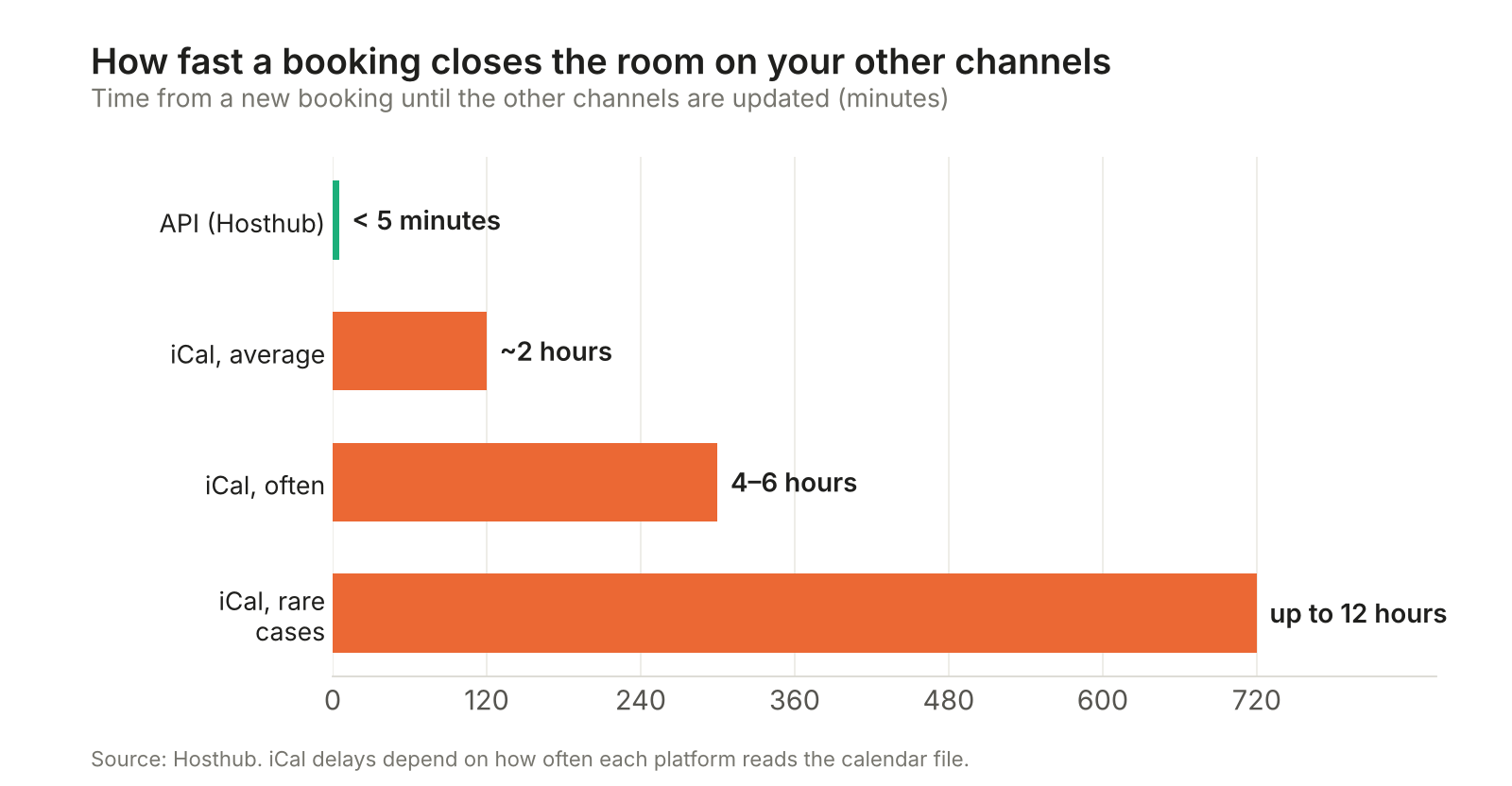
A channel manager connects to both platforms through their official APIs instead. Bookings, availability and prices move in minutes, both ways, and you manage both listings from one calendar and one inbox. Hosthub syncs Airbnb and Booking.com, plus 200+ other channels, in under 5 minutes, and backs it with a Zero Double Booking Guarantee on API-connected channels.
Before you start: a 6-point checklist
- Your listings exist on both platforms. The channel manager connects listings you already have. It does not create them. If you are not on Booking.com yet, see how to create a listing on Booking.com (or on Airbnb).
- The basics match on both. Same maximum guests, bedrooms and room setup. If one site says 6 guests and the other 4, you will get bookings you cannot honor.
- You know your logins. Your Airbnb account, and admin access to your Booking.com extranet (including two-factor verification on your phone).
- You have only one connectivity provider on Booking.com. Booking.com allows one connectivity provider per property. If you used another channel manager before, disconnect it first.
- You have decided your pricing approach. Same payout from both channels, or same price for guests on both. See pricing both channels below.
- You know which iCal links exist. Note any calendar links already imported between Airbnb and Booking.com (or Vrbo, or Google Calendar). You will remove them after connecting.
How to connect Airbnb and Booking.com, step by step
Here is how it works in Hosthub. Most channel managers follow a similar process.
Step 1: Create your account and add your properties
Start a free 14-day trial and add your properties (“rentals”). One rental is anything with its own availability calendar.
Step 2: Connect Airbnb
In Hosthub, go to the channels setup, choose Airbnb and sign in to your Airbnb account to authorize the connection. Hosthub then pulls in your Airbnb listings. If you manage several Airbnb accounts, for example for different owners, you can connect each of them.
Step 3: Connect Booking.com
Booking.com connections run through its connectivity-provider program. You approve Hosthub as the connectivity provider for your property in the Booking.com extranet, and Hosthub then pulls in your rooms and rates. Hosthub’s onboarding walks you through the exact screens.
Step 4: Link each property to its listings
Match each Hosthub rental to its Airbnb listing and its Booking.com room. If you sell identical rooms as one room type, or a house both whole and by room, set that up here: Hosthub supports rental relations and multi-unit room types.
Step 5: Check the imported bookings
Upcoming bookings from both channels come in automatically. Compare the Hosthub calendar with each platform’s calendar for the next few months. They should match exactly.
Step 6: Remove old iCal links
Delete any calendar links you had imported between Airbnb and Booking.com. If you leave them, the old slow sync keeps running next to the API connection, and can block dates by mistake.
Step 7: Set your prices and publish
Set your base rates in Hosthub’s rate management, add a markup per channel if you want, preview the result and publish. Then open each listing as a guest would and check the final price.
Setting this up yourself usually takes an hour or two for a few properties. On Hosthub’s Pro plan, the team does it with you, including moving you from another channel manager.
Airbnb vs Booking.com: differences that affect your setup
A channel manager syncs the essentials, but the two platforms still work differently. Knowing where helps you avoid surprises:
Swipe the table to the right to see all columns ➜
| Airbnb | Booking.com | |
|---|---|---|
| Your fee | Host-only fee of about 15.5%, deducted from your payout | Commission set in your agreement. Deducted from the payout or invoiced monthly, depending on your payment setup |
| Who collects payment | Airbnb, always | Booking.com or you, depending on your payment setup |
| Instant booking | Optional (Instant Book or requests) | Bookings are instant |
| Fees and discounts | Cleaning, pet and other fees, and weekly, monthly, early-bird and last-minute discounts can be set from Hosthub | Discounts and promotions are managed in the Booking.com extranet |
| Guest phone number | Shared with the host after booking | No longer sent to channel managers since September 28, 2026. Find it in the extranet or collect it with an online check-in form |
| Links in messages | Allowed within Airbnb’s rules | External links are blocked unless you allow them in the extranet’s messaging security settings |
| Listing content | Photos, descriptions and amenities are edited on each platform | |
Two practical consequences:
- Write your messages once, check them on Booking.com. Hosthub’s automated messages go to guests on both platforms, but a message with a link to your house manual will fail on Booking.com until you allow that link. Hosthub’s help center explains how to allow links for Booking.com messages.
- Collect phone numbers before arrival. For Booking.com guests, an online check-in form is the simplest way to get the phone number, email and arrival time, synced back into the booking.
Pricing Airbnb and Booking.com correctly
The two platforms take different cuts, so the same nightly price gives you a different payout on each. Most hosts set one base rate in the channel manager and a percentage markup per channel to keep the same payout. Because the fee is charged on the final price, the markup must be slightly higher than the fee itself:
Swipe the table to the right to see all columns ➜
| To keep $150 per night | Fee or commission | Markup needed | List at |
|---|---|---|---|
| Airbnb | 15.5% | +18.3% | $177.51 |
| Booking.com (example) | 15% | +17.6% | $176.47 |
| Booking.com (example) | 18% | +22.0% | $182.93 |
The formula: markup = fee ÷ (1 − fee). Check your actual Booking.com commission in the extranet first, as it varies by property and by programs such as Genius. In Hosthub, you set the markup per channel, and you can also choose to keep the same price on every channel instead. More in Hosthub’s help center: how Hosthub handles channel fees.
If you use a dynamic pricing tool such as PriceLabs, connect it to Hosthub and turn off Airbnb’s own Smart Pricing, so only one system sets your rates.
Common problems and how to fix them
Swipe the table to the right to see all columns ➜
| Problem | Likely cause | Fix |
|---|---|---|
| Dates blocked that should be open | An old iCal link is still imported on Airbnb or Booking.com | Remove the iCal import on each platform |
| Can’t connect Booking.com | Another channel manager is still the connectivity provider | Disconnect the old provider in the extranet, then connect again |
| Prices on Airbnb differ from Hosthub | Airbnb Smart Pricing is on, or a channel markup is set | Turn off Smart Pricing, check the channel markup |
| Booking.com discount not showing | Booking.com discounts are not set from the channel manager | Create the promotion in the Booking.com extranet |
| Message to a Booking.com guest fails | It contains a link that is not allowed | Allow the link in the extranet’s messaging security settings |
| Booking.com room shows no availability | The room or rate plan is not linked | Check the mapping for that room in Hosthub |
| Wrong prices in another currency | Listings use different currencies | See Hosthub’s guide to multiple currencies |
Frequently asked questions
Can I connect Airbnb and Booking.com without a channel manager?
Yes, with iCal: export each platform’s calendar link and import it into the other. It is free, but it only syncs availability, not prices, and updates can take hours, which is how double bookings happen.
What is the best channel manager for Airbnb and Booking.com?
Look for API connections to both, fast two-way sync, per-channel pricing and a unified inbox. Hosthub connects both through their APIs, syncs in under 5 minutes and guarantees zero double bookings on API-connected channels. See our comparison of the best channel managers for vacation rentals.
Will connecting a channel manager change my listings?
Your photos, descriptions and reviews stay as they are. The channel manager takes over availability and, if you choose, prices and some fees, so make changes to those in the channel manager from then on.
Do I keep my reviews and Superhost or Genius status?
Yes. Connecting a channel manager does not create new listings, so your reviews, ratings and status stay with your existing listings.
Can I set different prices on Airbnb and Booking.com?
Yes. Set one base rate and a percentage markup per channel, or set different prices directly. Most hosts use a markup to keep the same payout from both.
How long does it take to connect both?
Usually an hour or two for a few properties if you do it yourself. On Hosthub’s Pro plan, the team sets it up with you.
What happens to bookings I already have?
Upcoming bookings on both platforms are imported automatically when you connect, so your calendar is complete from day one.
About Hosthub
Hosthub is a channel manager and property management system for short-term rental hosts and property managers. It connects your properties to Airbnb, Booking.com, Vrbo, Expedia and 200+ other channels, keeps availability and rates in sync in under 5 minutes and backs it with a Zero Double Booking Guarantee. One calendar, one inbox with an AI Co-host, automated messages, rate management, team access and reports, from $13.60 per property per month for 2 to 10 properties on an annual plan. Try it free for 14 days.
Platform rules and menu names checked in October 2026. Airbnb and Booking.com change their settings often, so check their help centers if a screen looks different.